
Salary payslip generator tool is an online application that helps organizations create professional salary slips for employees. This digital tool provides you with complete employee salary details such as income, deductions and net pay.
Payslip Details
Employee Details
Earnings
Deductions
What Is a Salary Pay Stub Generator?
This salary stub maker automates the process of creating professional pay stub. Our electronic payslip tool helps you put your payroll data into format that can generate PDF printable/downloadable payslip instantly. This is free pay stub generator with calculator to check your net salary. Therefore, it allows you to create salary slip online without manual work with Excel sheet (.XLSX) or Word (.DOCX) template.
- Ensures timely and accurate payroll documentation
- Reduces the chance of human error
- Improves trust between the company and the employee
- Complies with labor and taxation laws
6 Key Components of Esalarypayslip salary payslip generator
Check Stub Maker Tool To Create Customizable Salary Payment Slip
Firstly, the check stub generator tool is used to create salary slip to provide staff with proof of payment. Our payslip tool provides well-structured, customizable salary details that fully inform employees of their monthly earnings and deductions.
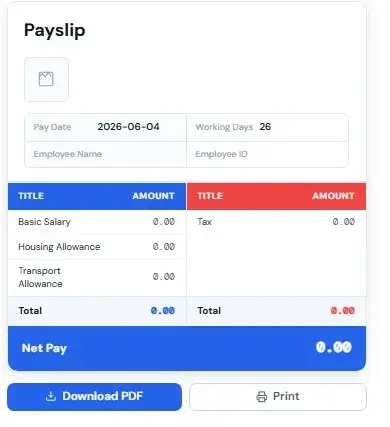
1. Company Information
Includes the company name, logo, address and contact details for authenticity.
2. Employee Information
- Full name
- Designation
- Department
- Employee ID
- Pay period
3. Work Days & Pay Date
Furthermore, it outlines the number of working days in the payroll cycle such as days attended and specifies the exact date of salary payment.
4. Earnings
The earnings show gross income before deductions are applied. This section includes:
- Basic Salary: The fixed portion of an employee pay is known as basic salary. It typically comprises 35% to 50% of the gross salary.
- Bonus: Performance-based reward.
- House Rent Allowance (HRA): The compensation for living expenses means the employee lives in rented accommodation or is provided by the company.
- Medical Allowance: Monthly contribution to medical costs.
- Cost of Living Allowance (COLA): It is adjusted to inflation and cost changes in the employee living area.
- Custom Allowances: The users can add incentives such as fuel allowance, meal vouchers, travel allowances and others.
5. Deductions
The meaning of deductions is amounts subtracted from gross salary in line with the statutory guidelines or company-based reasons.
These may include:
- Provident Fund (PF): Retirement savings contribution by the employee.
- Income Tax (TDS): Deducted at source which is based on individual salary tax slabs.
- Welfare Fund: All the contributions to employee welfare programs.
- Arrears: Adjustments for delayed or revised payments.
- Custom Deductions: You can add more options as per your need such as loan repayments, fines or insurance premiums.
Deductions ensure tax compliance, social security contributions and financial management within organizations.
6. Calculating Gross Salary and Net Salary using the Salary Payslip Generator
Gross Salary: Total salary before deductions so this means salary before deduction of income tax, PF fund or loan from the salary.
Formula: Gross Salary = Basic Salary + Allowances + Bonuses
Moreover, the gross salary consists of fixed and variable income and it is used for calculating taxes and benefits.
Net Salary: It is the actual amount that the employee receives after all deductions.
Formula:
Net Salary = Gross Salary – Total Deductions
These fields within our salary payslip generator are entirely free, online, add currency, simple and customizable. So, check out the complete step-by-step guide to use our salary pay slip generator tool.
Importance of Salary Payslip Generator Tool
Proof of income, tax and legal compliance
It is an important tool for both employees and organizations to provide proof of income earned, financial transparency, error detection, compliance with labour laws and tax filing.
Employee financial management and motivation
Payslip also allows employees to know their total compensation and deductions in order to manage their monthly budget effectively.
Free Download Salary Payslip Template
You can also download our sample salary payslip format/template in Excel and Word to help you prepare offline.
You can also use our online payslip-making tool at any time, without signing up and free of charge.
Frequently Asked Questions (FAQs)
First, enter employee details, salary and deductions in a payslip generator or template. Then, click generate to download the payslip in PDF format.
To begin with, use an online payslip generator and fill in required fields. After that, download the automatically created salary slip.
Initially, open a payslip template in Excel and input salary details. Next, use formulas to calculate totals and save or print the file.
Generally, payslips are generated at the end of each salary cycle. In most cases, they are issued monthly after salary processing.
To start with, add employee information, salary breakdown, and deductions. Then, use the generator to create the payslip.
Yes, it is completely free. Moreover, there are no hidden charges and you can create unlimited payslips anytime.
Yes, your data is secure. In fact, it is temporarily stored in your browser and is not shared with others.
Typically, payslips are generated in PDF format. As a result, they are easy to download, print and share.
Yes, it can be used as proof of income. However, acceptance mainly depends on the bank or organization.
Calculations are based on standard formulas and inputs. Therefore, you should verify them with your finance team for accuracy.
No, you cannot edit generated payslip directly. Instead, update the details and generate new one.
Basically, you need employee name, salary details and deductions. Additionally, company details and payment date are required.
Yes, you can generate payslips for multiple employees. Simply enter each employee details separately.
Yes, it works on phones, tablets, and desktops. Therefore, you can generate payslip from any device.