
Pay Raise Calculator
| Frequency | Old Pay | New Pay | Difference |
|---|---|---|---|
| Hourly | $0.00 | $0.00 | +$0.00 |
| Weekly | $0.00 | $0.00 | +$0.00 |
| Monthly | $0.00 | $0.00 | +$0.00 |
| Annually | $0.00 | $0.00 | +$0.00 |
What is Pay Raise Calculator?
Pay raise calculator provides the total amount of your new income after the increase. The salary increase is received during the course of promotion, higher wage or to calculate future earnings. This salary raise calculator is reliable tool that makes the process simple and accurate.
How to use it
In order to use the salary increase percentage calculator, you need to enter your current salary and the percentage increase to quickly calculate your new earnings. Similarly, the raise pay calculator percentage tool will also show the percentage difference between your old and new salary. This is useful information during salary negotiations or performance reviews.
This calculator is also showing the complete data in terms of hourly, weekly, monthly and annually pay raise. For example, if you are paid by the hour, an hourly pay raise calculation guides your updated hourly wage and estimates how it affects your weekly, monthly and annual income.
For example, if you earn $50,000 annually and receive 5% raise. Your annual pay increases by $2,500 which bringing your new base total to $52,500.
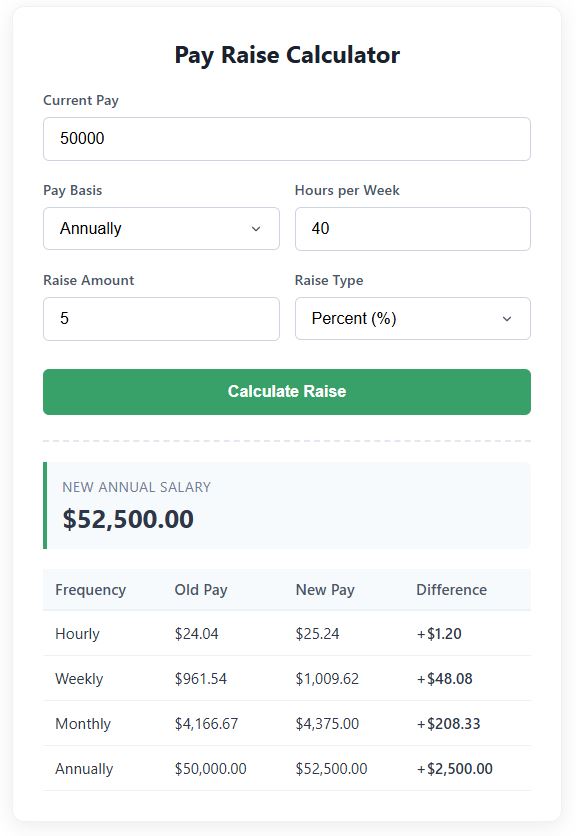
Furthermore, employees on fixed salaries can use this digital pay raise calculator to calculate monthly pay raise, weekly pay raise or annually pay raise to understand the total amount of change in salary after the increment.
Why Use a Salary Raise Calculator?
- Rapidly calculate your new salary after raise or an incremental increase.
- Find the percentage increase between two salaries.
- Calculate hourly, weekly, monthly and annual earnings.
- Compare different raise scenarios before accepting an offer.
FAQs
How to calculate pay raise?
The formula to calculate pay raise is equal to subtracting the current salary from your new salary to find the increase amount. Subsequently, divide the increased amount by the initial salary and multiply by 100 to calculate the percentage increase.
How to calculate a pay raise?
In order to calculate pay raise, you need to multiply your current salary by the raise percentage. Add the result to your current salary to find your new total salary.
How to calculate pay raise percentage?
Pay Raise Percentage = (New Salary – Current Salary) / Current Salary × 100
How to calculate back pay for a raise?
Calculate the difference between your old and new pay rate then multiply it by the number of hours or pay periods worked before the raise was applied. This gives your calculation of total back pay.
Other Calculator and Payslip tools
Also, check out our following calculator and Salary Pay slip tools.